 atareh
Claude Code · JUL 2, 2026
Print your own morning newspaper with AI
One copy-paste prompt turns Claude Code or Codex into a personal print shop — calendar, email, weather, and news on one page, printed automatically every morning.
Ryan Doyle (@doooyle) posted a photo of a laser printer holding a one-page newspaper his AI prints for him every morning — unread messages, calendar, surf report, news — and it did huge numbers, because everyone instantly got it. I set up my own version the same day. This guide gives you the single prompt that builds yours.
You paste one block of text into Claude Code or Codex. The AI interviews you about what belongs in your paper, checks what it can actually reach on your machine, designs the layout, does a test print, and schedules itself to run every morning. You answer a few questions and stand near the printer.
Check your phone without checking your phone
The morning phone check is a trap with a real justification: “what if there's something urgent?” So you unlock it to check one thing, and 25 minutes later you're watching a stranger argue about zoning laws. Every study on morning screen use says the same thing, and none of them have fixed it, because the urgency excuse is legitimate.
A printed page answers the excuse without the trap. You get the calendar, the unread count, the one email that actually needs you — on paper, which has no feed, no red dots, and nothing to scroll. If the paper says nothing is on fire, the phone stays where it is.
What you need
No printer yet? Run the prompt anyway and skip the print step — the AI will drop a PDF on your desktop every morning instead, and you can add the printer later.
The prompt
Copy this whole block, paste it into Claude Code or Codex in your terminal, and hit enter:
I want a printed "morning newspaper" every day, so I can check my phone without checking my phone. You're going to set the whole thing up for me right now. Work step by step and ask me questions along the way — don't assume.

STEP 1 — INTERVIEW ME
Ask me, one question at a time:
- What sections do I want? Offer: today's calendar, unread emails (count + who they're from + anything urgent), unread texts, weather forecast, top news headlines, plus one fun personal section (surf report, stock watchlist, sports scores, word of the day — my pick).
- What time should it print each morning?
- What should my paper be called? Suggest "The [My Last Name] Dispatch" as the default.

STEP 2 — CHECK WHAT YOU CAN ACTUALLY ACCESS
Figure out what data sources are available on this machine before promising anything.
- On a Mac, prefer local apps first: Calendar via AppleScript, and Mail via AppleScript if I actually use the Apple Mail app.
- If my email is Gmail in a browser, offer to set up the free Gmail MCP (npx @gongrzhe/server-gmail-autoauth-mcp): walk me through creating the Google OAuth key in my browser click by click, then authenticate. One-time setup, about 10 minutes. If I decline, drop the email section — don't improvise other APIs.
- Unread texts live in ~/Library/Messages/chat.db, which macOS blocks until I grant Full Disk Access. Tell me the exact entry to add in System Settings — the shell that will run the scheduled job (e.g. /bin/zsh) — and open a Finder window at that file so I can drag it into the list. IMPORTANT: in the scheduled script, read that database directly from the granted shell with sqlite3, never through python or another interpreter — macOS attributes the read to the interpreter and will still block it.
- Weather and news can come from free public sources (wttr.in for weather, RSS feeds for headlines).
- If a section I asked for isn't accessible, tell me plainly and either walk me through connecting it or drop the section. Never fill a section with made-up data — if a source fails, print "couldn't reach [source]" in that section instead.

STEP 3 — BUILD THE PAPER
Write a script that gathers my sections and lays them out as a clean one-page newspaper (HTML rendered to PDF):
- Masthead with the paper's name, today's date, and a one-line summary at the top ("2 meetings, 4 unread emails, rain at 3pm").
- Serif fonts, thin rules between sections, real newspaper energy. It should look like a tiny broadsheet, not a log file.
- Keep it to one page. Ruthlessly summarize.

STEP 4 — TEST PRINT
Find my default printer (lpstat -p on Mac/Linux) and print today's edition right now with lpr. If no printer is set up, help me add one. Show me the PDF too so I can approve the layout.

STEP 5 — SCHEDULE IT
Once I approve the test print, schedule it to run automatically every morning at my chosen time (launchd on Mac, cron on Linux).
- Scheduled jobs start with an almost-empty PATH: use absolute paths for every binary the script calls.
- After scheduling, trigger the job once (launchctl kickstart on Mac) and confirm the paper prints from the scheduled context — passing in this chat is not the same as passing at 7 AM.
- The scheduler can't wake a sleeping Mac. If this is a laptop, tell me what happens when it's asleep at print time (the missed run fires on next wake — the paper prints when I open the lid), and offer me the optional pmset command that schedules a daily wake a few minutes before print time. Give me the command to run myself; it needs sudo.
Then tell me how to pause or change the schedule later.

STEP 6 — SAVE EVERYTHING
Put all the files in ~/morning-paper/ with a short README explaining how to edit sections, change the time, or uninstall.

If I'm not on a Mac, adapt every step to my OS. Start with Step 1 now.What happens when you paste it
The prompt is structured so the AI does the work in the right order. First it interviews you — sections, print time, the name of your paper. Then it audits what it can actually reach on your machine before promising anything, which matters more than it sounds: the failure mode of AI setups is a beautiful script wired to data it can't access.
The “never fill a section with made-up data” line is doing real work in there. Without it, a model that can't reach your calendar will sometimes print a plausible-looking calendar anyway. With it, a broken section prints “couldn't reach Messages” and you know to fix the permission instead of trusting a hallucinated schedule.
After you approve the test print, it schedules itself with the operating system's own scheduler — launchd on a Mac — so the paper prints whether or not anything AI-related is open. The whole setup lives in ~/morning-paper/ where you can read every line it wrote.
The fine print in Steps 2 and 5 is there because I hit every one of those walls setting up my own: the Full Disk Access trap where granting the shell isn't enough if python touches the database, the scheduler's empty PATH, the Gmail-in-a-browser problem. The prompt hands your AI the answers so you don't debug them yourself at 11 PM like I did.
How mine came out
Mine is called The Atareh Dispatch. It prints at 7:00 AM in Dubai with my calendar (including the Formula 1 schedule — the only calendar I actually keep), unread email from the last 24 hours with urgent items flagged, the hourly weather, BTC and ETH and SOL, and headlines from TechCrunch, The Verge, and Hacker News.
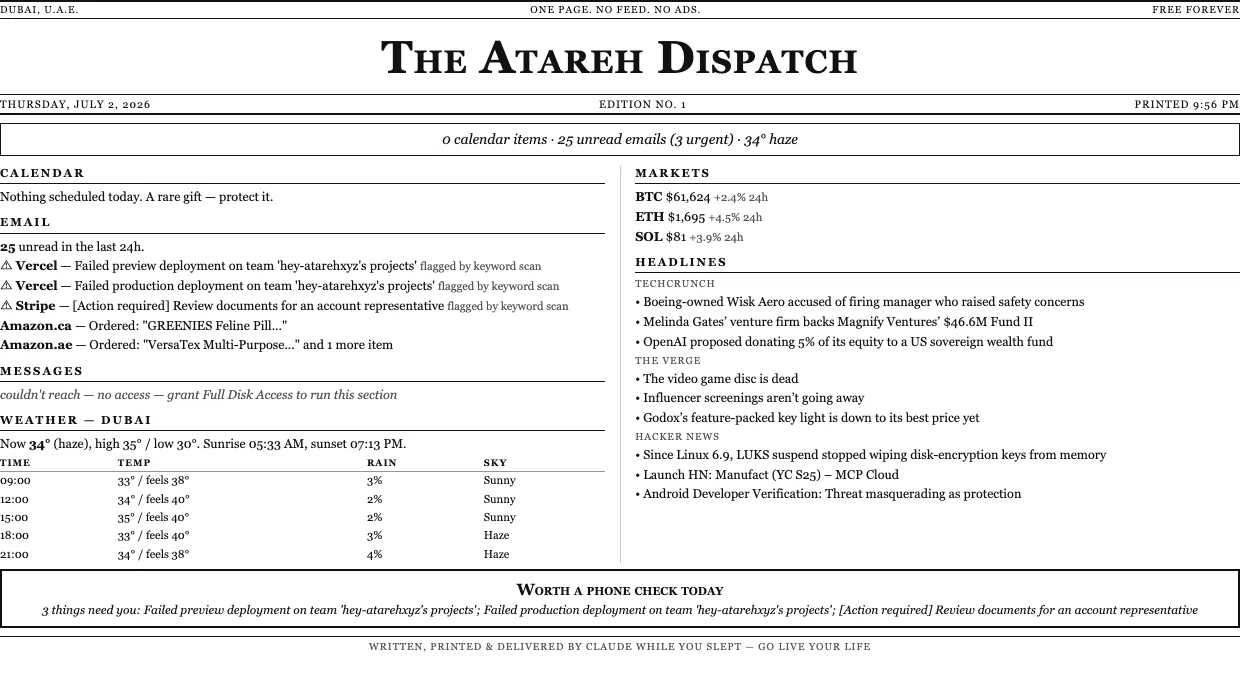
My favorite part is the verdict box at the bottom. The paper reads the urgency signals — failed deploys, payment problems, humans waiting on a reply — and prints a ruling. Edition no. 1 ruled “Worth a phone check today,” and it was right: two failed Vercel deploys and a Stripe compliance request I would have found hours later. On a quiet day it prints “Probably not worth a phone check. Skip the phone; go do something real.” Steal that idea — ask for it in Step 1 as your fun section.
Make it yours
Once the pipeline exists, every change is one sentence to Claude Code from inside ~/morning-paper/. Some directions worth stealing:
- Ryan's surf report — his paper grades the waves and tells him whether the beach beats the phone. Swap in whatever your version of surf is.
- A kids' edition — school calendar, weather for the walk, one fun fact. Print two copies.
- An evening edition — tomorrow's first meeting and what to prep, printed at 9 PM so the morning paper has nothing urgent left to say.
The printer is the point. A notification would defeat it, an email would defeat it — paper is the only inbox with no way to reply.
Written by
@atareh
AI architect & creator. Writing, designing, and producing in AI and tech. Previously head of product at a healthtech SaaS; background in molecular science. Founded gogray.today in 2017.
Related
Keep reading.
Made by @atareh · x / twitter · instagram