 atareh
Research & Op-ed · JUN 18, 2026
Turn YouTube into a research engine with one Claude Code skill
Install the youtube-full skill, then go from a single video summary to a full multi-source research report — transcripts, synthesis, and a finished PDF, all from plain-English prompts.
YouTube is the biggest research library on the planet, and most of it is locked inside video you have to sit through. The youtube-full skill hands that library to Claude Code: it can read transcripts, search videos and channels, and pull whole playlists — so you describe a research job in plain English and get back a written answer.
Below I install it, summarize a single video as a warm-up, then run the real workflow: “find the top 5 videos on a topic and write me a research report.” The finished report — a 12-page PDF on longevity peptides — is linked further down. Everything here is the exact run from the companion video.
What youtube-full actually is
A skill is a folder with a SKILL.md that teaches Claude a new trick. youtube-full is a thin wrapper around the TranscriptAPI endpoints, so once it's installed Claude knows how to hit YouTube for you. The capabilities worth knowing:
- Transcripts — full text of any video that has captions, with timestamps and metadata.
- Search — videos or channels by query, ranked, with view counts and durations.
- Channels & playlists — latest uploads, every video on a channel, search within a channel, full playlist contents.
It comes from the ZeroPointRepo/youtube-skills repo. The youtube-full bundle is the everything-in-one version; the repo also ships narrower skills if you only want, say, transcripts.
Install it in one command
One line installs it for Claude Code (and any other agent you have set up). Run it from anywhere:
npx skills add ZeroPointRepo/youtube-skills --skill youtube-full
The installer clones the repo, drops the skill in, and symlinks it for Claude Code. When it finishes you'll see a security summary — and on this one it flags High Risk. Don't skip past that.
Add your API key
Grab a free key at transcriptapi.com (it starts with sk_). Rather than let the skill hunt for somewhere to store it, I put it in Claude Code's settings so every session picks it up automatically. Add an env block to ~/.claude/settings.json:
{
  "env": {
    "TRANSCRIPT_API_KEY": "sk_your_key_here"
  }
}
The block loads at session start, so restart Claude Code (or paste the key inline once) and you're live. To confirm it works without spending a credit, the channel-resolve endpoint is free:
curl -s "https://transcriptapi.com/api/v2/youtube/channel/resolve?input=@TED" \
  -H "Authorization: Bearer $TRANSCRIPT_API_KEY" \
  -H "User-Agent: ClaudeCode/1.0"
A JSON response with a channel ID means you're good to go.
Warm-up: summarize a single video
The simplest use is also the one you'll reach for most — paste a link, ask for a summary. Claude pulls the transcript and reads the whole thing, so the summary is grounded in what was actually said, not a guess from the title:
Summarize this YouTube video and pull out the key takeaways: https://www.youtube.com/watch?v=zU5EYw06wtwThat one is a 90-minute Huberman Lab episode on peptides. A few seconds later I had a structured breakdown — the four categories he covers, the specific compounds, dosing, and every risk he flags. Reading time instead of watch time.
The real workflow: a topic into a report
Summarizing one video is handy. The payoff is research across many. Here is the cleaned-up version of the prompt I used — one sentence that chains search, transcript-pulling, analysis, and export:
Use the youtube-full skill to find the top 5 videos on longevity peptides. Pull each transcript, analyze them, and write me a research report comparing what each expert claims — where they agree, where they disagree, and how strong the evidence is. Export it as a PDF.Claude ran the skill's search, ranked twenty results by relevance and view count, picked the top five, and pulled every transcript. To keep its own context clean it spun up a subagent per video to extract structured notes, then synthesized the lot. These were the five it landed on:
- The Peptide Expert — Dr. Alex Tatem, The Diary Of A CEO (2.6M views)
- Benefits & Risks of Peptide Therapeutics — Andrew Huberman (1.2M)
- Peptide & Hormone Therapies for Health, Performance & Longevity — Dr. Craig Koniver on Huberman Lab (613K)
- Complete Guide to Peptides for Fat Loss, Muscle & Longevity — Dr. Kyle Gillett on Thomas DeLauer (520K)
- Top 5 Peptides for Longevity — Quinn Stillson MD (55K)
The whole run cost about six credits — one search plus five transcripts — out of the free 100.
What it produced
The output is a 12-page PDF: a cover, a cross-video synthesis table scoring every peptide by evidence tier, per-video deep dives with the speakers' conflicts of interest, and a section on where the experts flatly disagree. I rendered it from styled HTML through headless Chrome, so the typography holds up.
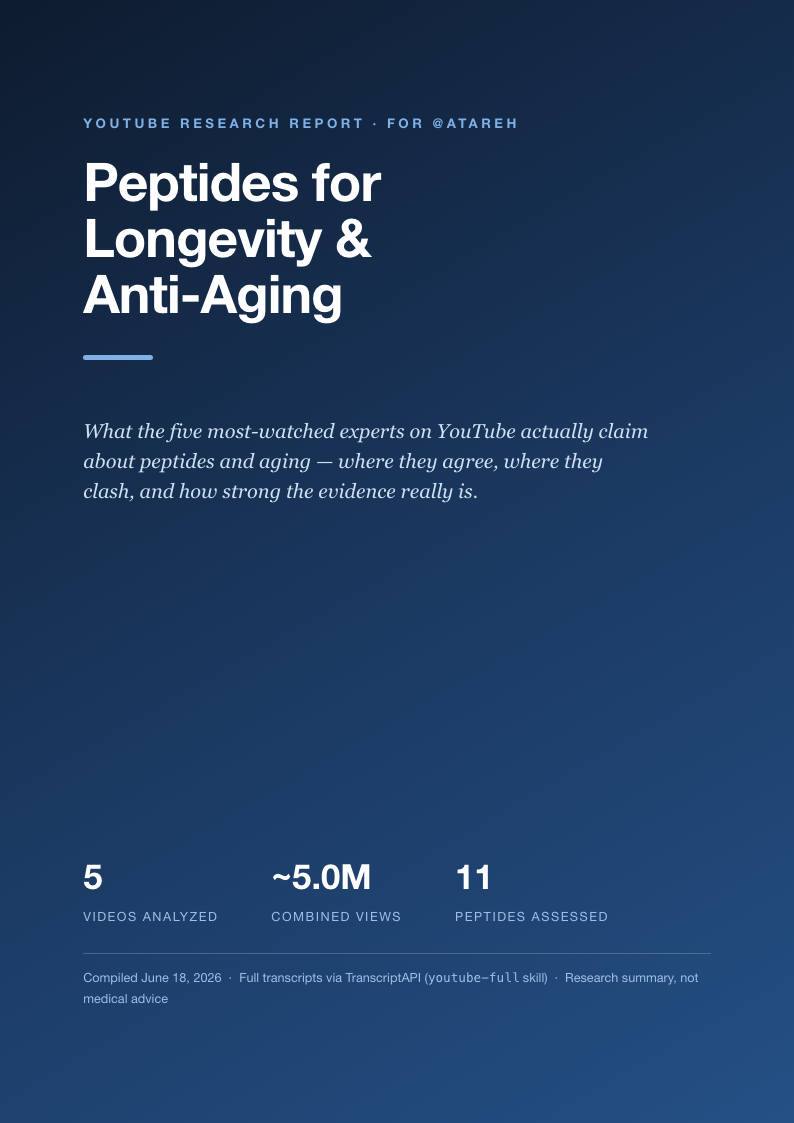
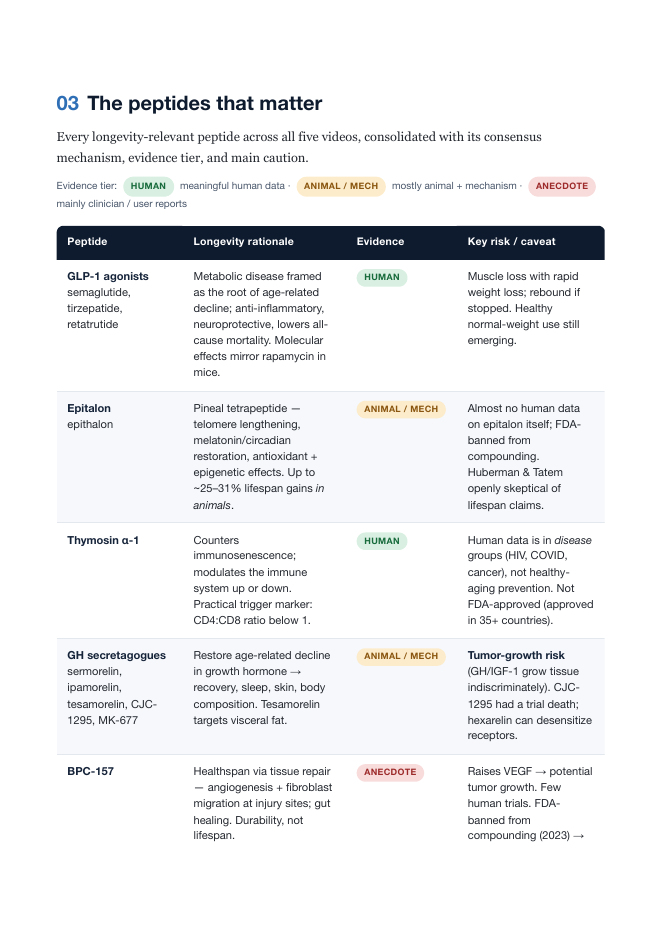
Longevity Peptides — YouTube Research Report
12 pages · synthesized from five videos · generated by Claude Code via the youtube-full skill.
Download the PDF →How it works under the hood
The skill documents a three-step research loop, and Claude follows it on its own once you describe the goal:
Search
A query against the search endpoint returns ranked results with view counts and durations — enough for Claude to pick the strongest videos without you naming them.
Pull transcripts
For each chosen video, Claude hits the transcript endpoint and gets the full text. Long episodes blow past a normal reply, so it saves them to disk and reads in chunks — or, for a big batch, fans out a subagent per video.
Synthesize
With every transcript in hand, the comparison is just reading: line up the claims, flag agreement and conflict, weigh the evidence, and write it up. The PDF is the last mile.
Channel and playlist endpoints follow the same shape, so “what did this creator post this month” or “summarize every talk in this playlist” work the same way. Resolving a handle and listing latest uploads are free; transcripts and search cost a credit each.
Make it your own
Once the skill is in, the patterns stack up fast. A few I'd reach for next:
- Competitor watch — pull a channel's latest uploads weekly and summarize what they shipped.
- Course notes — feed a full playlist and get one set of structured notes across every lecture.
- Put it on a schedule — wrap the research prompt in a routine so a fresh report lands in your inbox every Monday.
The arc is the same every time: install once, describe the job in plain English, and let Claude turn hours of video into something you can read in five minutes. The peptides report took one sentence and about six credits.
Written by
@atareh
AI architect & creator. Writing, designing, and producing in AI and tech. Previously head of product at a healthtech SaaS; background in molecular science. Founded gogray.today in 2017.
Related
Keep reading.
Made by @atareh · x / twitter · instagram