 atareh
AI Workflow · MAY 10, 2026
Codex /goal mode: interrogate first, then run
/goal lets Codex run autonomously for hours or days. The trick to getting good output is one prompt before you ever type /goal — make the agent interrogate you first.
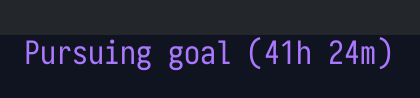
Codex shipped /goal mode — a long-running agent that works for hours or days on a single objective. Mine has run for 41 hours straight. The default experience is rough: you describe what you want in a paragraph, hit go, and come back to something that loosely resembles your idea.
The fix is one extra step before you ever type /goal. Make the agent interrogate you first.
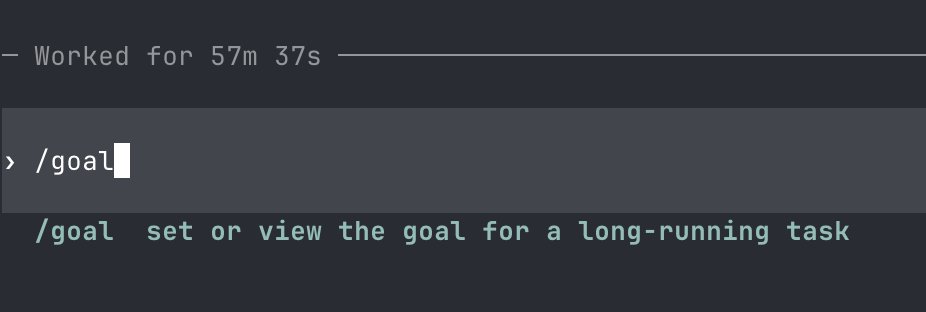
What /goal mode is
/goal is a Codex command that hands the agent an objective and lets it run autonomously — planning, writing code, running tests, retrying failures — for as long as it takes. Hours. Days. The agent reports back when the goal is met or it gets truly stuck.
It is the closest thing we have to “tell the computer what you want and walk away.” And like any agent loop, the output quality is bounded by how clearly you specified the input.
The short version
Three steps. This is the whole workflow if you only read one section:
- Turn on plan mode in Codex.
- Run the interrogation prompt below. Answer everything it asks. At the end it gives you a fully-formed prompt for another agent.
- Open a fresh Codex session, paste that output as
/goal {the prompt}, and let it run. Push to Vercel when it's done.
The whole point is to front-load every decision the agent would otherwise have to guess at. Get the questions out of its head and into yours, before the long run begins.
The interrogation prompt
This is the prompt I paste into Codex (with plan mode on) before I touch /goal:
I want to build {insert details here}. Go into interrogation mode and ask me questions so you fully understand what it is I want. Be as detailed as possible and ask me so you have full clarity. At the end, give me a full prompt that I can give to another agent for /goal mode.The model will come back with 20–50 questions. Some you'll have answers for instantly. Some will surface decisions you hadn't even considered — auth flows, edge cases, what happens when a third-party API is down, which framework, which deploy target. Answer them.
When the back-and-forth ends, the model produces a single self-contained prompt that captures every answer you gave. That's your /goal input.
Turn on plan mode
Plan mode forces Codex to draft a plan before writing any code, and to check in at decision points. For the interrogation phase this is essential — you want a planning conversation, not the model jumping straight to npm init.
Open the composer, hit the + button, and flip the Plan mode toggle on. You'll see Plan appear next to the model picker.
Once interrogation is done and you have your final prompt, you can turn plan mode off for the actual /goal run if you want the agent to move faster. I usually leave it on until I've seen the first plan it produces.
Why this works: ambiguity compounds
Running an LLM in a loop means every iteration's output becomes the next iteration's input. Each step makes dozens of small decisions — which library, which file structure, which naming convention, what to do when a test fails. The agent doesn't have taste yet, so eventually it makes a call you wouldn't have. Everything downstream of that decision is now directionally off.
Picture a tree of possible outcomes. Every branch is a decision. With no upfront clarification, the agent picks every branch. You get one outcome out of effectively infinite, and it's rarely the one you imagined. Front-loading those decisions in interrogation prunes the tree before the long run starts.
This is also why “just write a more detailed prompt” is bad advice. Detail in a vacuum is worthless. The interrogation surfaces the specific decisions that matter for your project.
Multi-agent over single agent
Anthropic's research and my own experience both land on the same conclusion: an orchestrator-with-subagents setup beats a single smart agent on hard tasks. It burns more tokens, but the quality jump is real.
For a long /goal run, I want the main agent acting as an orchestrator that spawns small teams per task — one implementer, one reviewer. They go back and forth on a chunk of work until they're both happy, then report up. A reviewer subagent sees the code with no prior context, which means no self-delusion: it's reading the file fresh, not defending a decision it made an hour ago.
You can wire this in by including a line in your final /goal prompt:
For each task, spawn an implementer subagent and a reviewer subagent. The reviewer reads the implementation with no prior context. Iterate between them until both agree the work is done before moving on.Memory files for long runs
Context windows fill up. Subagents start fresh. When a run spans days, the agents need a place to dump and reload state — otherwise the project drifts as memory ages out.
Ask /goal to maintain four files at the project root and to read them at the start of every new context window:
GOAL.md— the top-level objective. What “done” looks like.STANDARDS.md— non-negotiable code quality rules (testing, lint, naming, architecture).IMPLEMENT.md— the workflow itself: how to spawn subagents, when to write tests, how to verify work.PROGRESS.md— a continuously updated log of decisions made and work done.
Ship it
When the run finishes, I do one quick read-through of PROGRESS.md, run the build, and push to Vercel. If you wired up vercel or a GitHub integration, the agent can do this itself — tell it explicitly in the /goal prompt: “when complete, run the build, then push to live and to Vercel.”
That's the workflow. Interrogate first, plan mode on, fresh session for the run, memory files for continuity, multiple agents per task. Try it on something small — a landing page, a CRUD app — before you point a 41-hour run at something serious.
Written by
@atareh
AI architect & creator. Writing, designing, and producing in AI and tech. Previously head of product at a healthtech SaaS; background in molecular science. Founded gogray.today in 2017.
Related
Keep reading.
Made by @atareh · x / twitter · instagram