 atareh
Claude Code · OCT 28, 2026
6 Claude Code prompts that edit a talking-head reel
The pack from my Comment CLAUDE reel: proof cards behind you, a glass chart, a freeze-frame sticker, a tier list, text behind your head and a color grade. One prompt each.
This is the pack from my “Comment CLAUDE” reel: six edits on one talking-head clip, one prompt each. No editing app. Claude Code writes a small Python pipeline, cuts me out of every frame with free on-device segmentation, draws the effect on top and renders the MP4 with ffmpeg.
Every prompt is below with a before and after from my own footage. Copy one, swap anything in {braces} for your own words and numbers, and paste it into Claude Code.
How to use these
Open a terminal in the folder with your clip, type claude, and paste prompt 00 first. It does the slow part once: cutting you out of every frame and tracking your face. All six effects reuse that, so none of them redo it.
Then paste any effect. Each one asks for stills before the full render, and that's the habit that saves the most time. If a still looks off, say it the way you'd tell an editor (“the card covers my chin, drop it 40px”), fix the still, then render the video.
The base layer
Every effect needs to know where you are in the frame. This prompt extracts the frames, cuts you out of each one, tracks your face box and writes fx.py, a small helper file the six effects share. On a Mac it uses Apple's Vision framework, which gives the cleanest cutout I've found for free. On Windows or Linux it falls back to MediaPipe.
Set up a video effects workspace in this folder for {clip.mp4}.

1. Check I have Python 3 and ffmpeg. Install anything missing.
2. Extract every frame to work/frames (1080x1920, 30 fps).
3. Cut me out of every frame with free, local segmentation. On a Mac use Apple's Vision framework (VNGenerateForegroundInstanceMaskRequest) through a small Swift script. On Windows or Linux use MediaPipe. Save masks to work/mask and blend each one with its neighbours so the edges don't flicker.
4. Track my face box on every frame into work/faces.json, smoothed over 9 frames.
5. Write fx.py with helpers: frame(i), mask(i), cutout(i), face(i), stills(seconds) to save check PNGs, and render(draw, path) that pipes frames to ffmpeg (H.264, crf 16). Draw with numpy and skia-python.

No effects yet. Show me one cutout on a dark background so I can check the edges.
Check that cutout before moving on. If the edges look chewed, every effect that puts something behind you will show it.
Proof cards behind you
Two glass stat cards tucked behind your shoulders. Your body overlaps them, so they look like they're in the room with you. The trick is the draw order: frame, then cards, then your cutout on top.
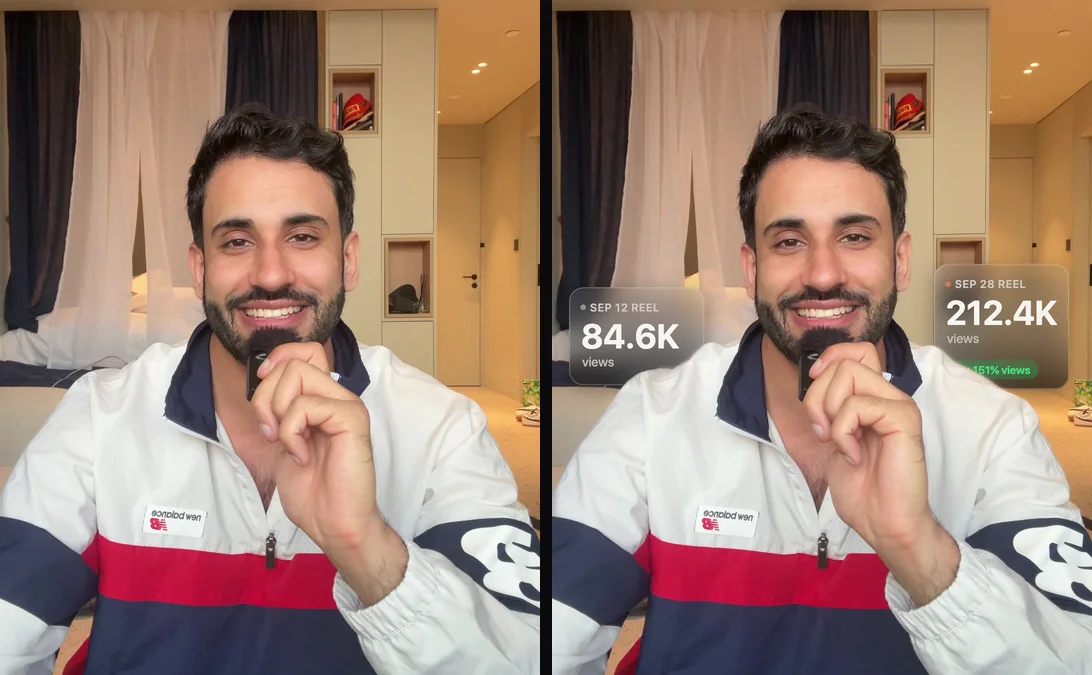
Using fx.py, make the over-the-shoulder effect and save it to out/over-the-shoulder.mp4.

Two dark frosted-glass stat cards sit just behind my shoulders, one on each side of my head. Find my shoulder line from the mask and put each card's bottom edge about 35px below it, so my body hides the bottom of the card. Draw order: frame, then cards, then my cutout on top.

Cards: 270px wide, 28px corners, ~30px background blur, dark tint, thin white border.
Left card: {SEP 12 REEL} / {84.6K} / views
Right card, taller: {SEP 28 REEL} / count up from {84.6K} to {212.4K} over 0.8s, then pop in a green pill: {+151% views}

Each card rises 60px on a soft spring, the left at 0.25s, the right at 0.45s. Neither card may touch my face.

Show me stills at 1s, 2s and 3s, then render.
You need: space beside both shoulders and two numbers worth comparing. Try next: “Add a third card that drops in above my head with {total views this month}.”
Liquid glass chart
A frosted chart card under your chin. The big number counts up and the bars spring in one by one. It anchors to your chin at its lowest point in the whole clip, so it never rides up into your face when you nod.
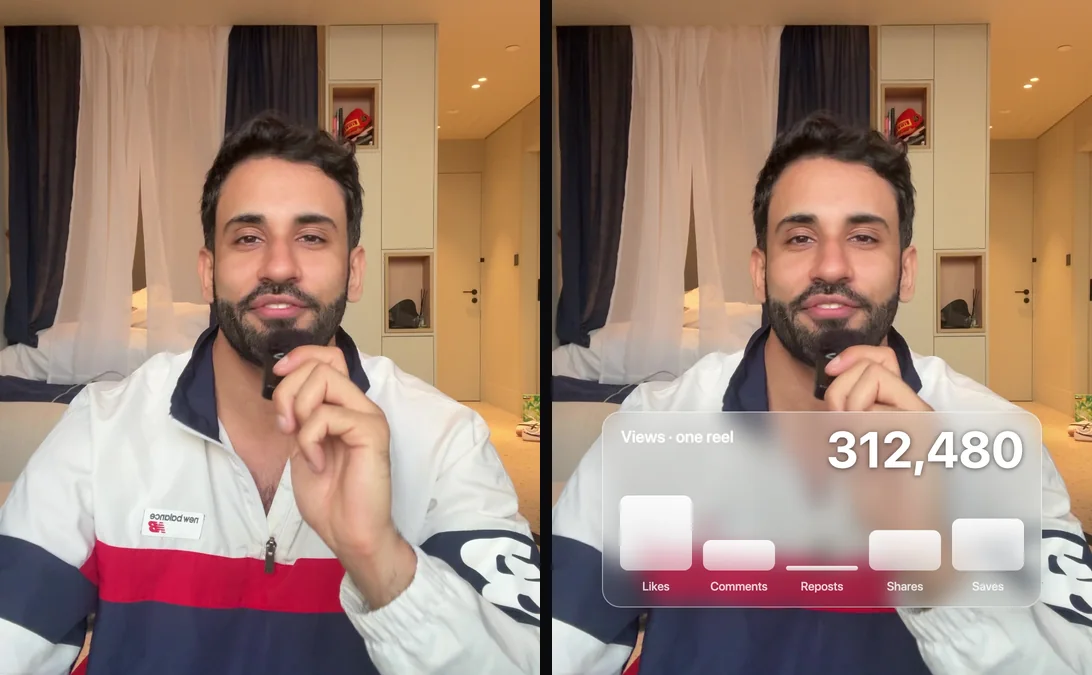
Using fx.py, make a liquid-glass stats card under my chin and save it to out/glass-graph.mp4.

One wide frosted-glass card, 880x390, centred. Put its top edge 70px below my chin at its lowest point in the clip (use faces.json). Strong background blur, white tint around 12%, thin bright border, 36px corners.

Inside: {Views · one reel} as a small label top-left, and a big number top-right that counts up to {312,480} with an ease-out. Underneath, five bars:
{Likes 18,240 · Comments 7,410 · Reposts 1,130 · Shares 9,820 · Saves 12,600}

The bars are frosted white glass with their names under them. They spring up one after another, 80ms apart, with a small overshoot. The card fades and lifts in at 0.3s.

Show me stills at 1s, 2s and 3s, then render.
You need: room under your chin, so chest-up framing, and up to five numbers. Try next: “Turn the bars into a line chart that draws itself left to right.”
Freeze frame sticker
The video stops, the room goes grey and you pop out as a sticker with a name tag. Then it all snaps back and keeps playing. Pick a frame where your hands are away from your face, or the white outline swallows them.
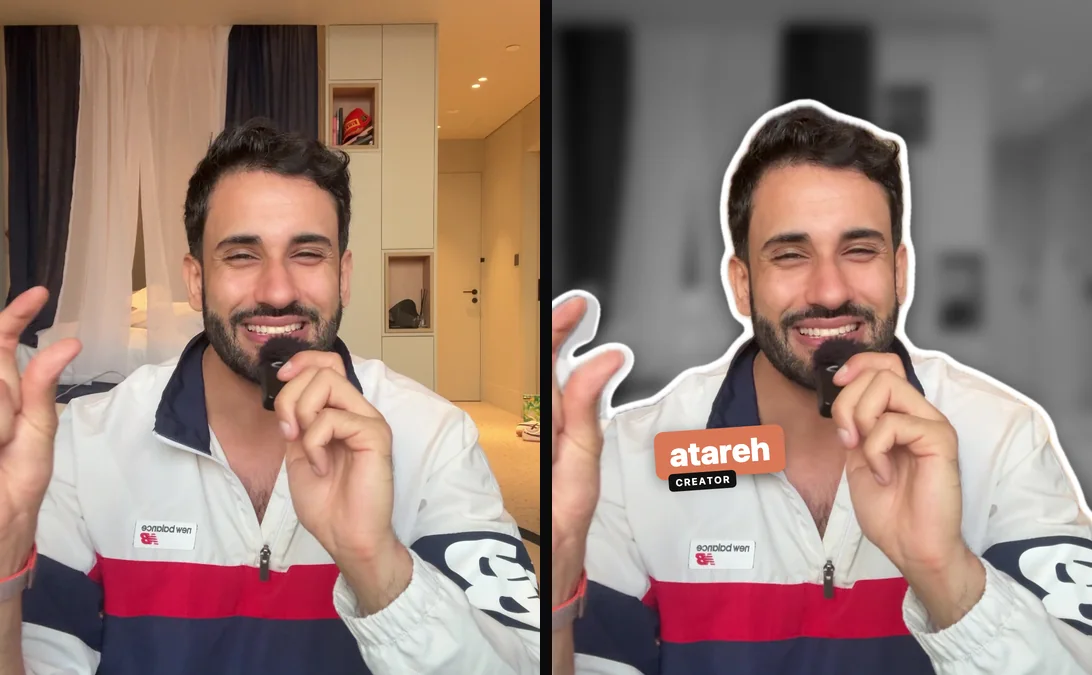
Using fx.py, make a freeze-frame sticker and save it to out/freeze-frame.mp4.

At {1.2s}, freeze on that frame with a 0.2s white flash. While it's frozen:
- the background goes black and white and blurs (~14px)
- my cutout gets a thick white sticker outline (dilate the mask) and a soft shadow, then pops forward on a spring: scale 1.06, rotate -2.5 degrees
- a name tag slaps on beside me, tilted -4 degrees: a coral (#D97757) block with {YOUR NAME} in heavy white type, and a small black pill under it that says {CREATOR}

Keep the tag clear of my face and hands. At {2.95s}, undo all of it and let the video play on.

Show me stills at 0.8s, 1.6s and 2.5s, then render.
You need: a clear gesture or pause about a second in. Try next: “Freeze twice, on the gesture and on the punchline, with a different tag each time.”
AI tier list
A slow push-in, then a tier list that builds itself under your face. S stays empty until the end, which is the whole point: people watch to see what lands there.
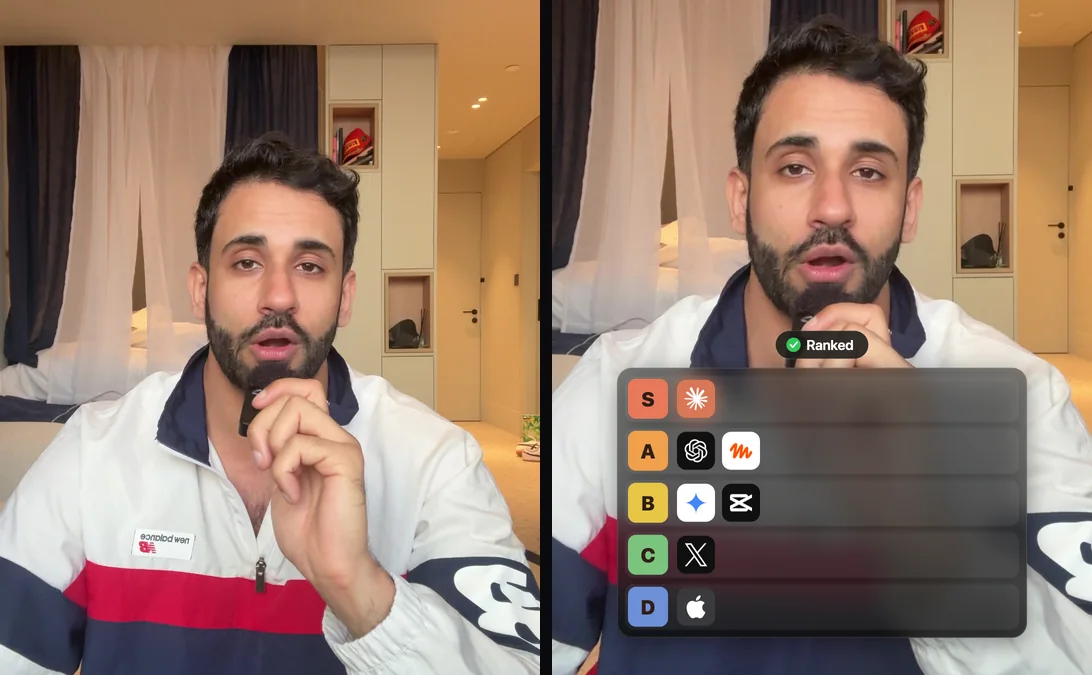
Using fx.py, make an AI tier list and save it to out/tier-list.mp4.

Push in slowly to 1.17x so my face sits in the top third. Under my chin, put a dark glass panel 820px wide with five rows, S A B C D. Each row starts with a coloured letter square: S coral, A orange, B yellow, C green, D blue.

Logo tiles drop into their rows one at a time with a small bounce:
{A: ChatGPT, Muse · B: Gemini, CapCut · C: X · D: Apple}
Leave S empty until 2.5s, then land {Claude} there with a soft glow.

Above the panel, a small pill says {Ranking AI tools…} with a spinner. When S lands, it flips to {Ranked} with a green check.

Use real logo SVGs (Simple Icons). Show me stills at 1s, 2s and 3s, then render.
You need: your face in the top half of the frame and rankings you'll defend in the comments. Try next: “Have one logo get knocked out of A and fall off the bottom of the frame.”
Text behind you
A huge word behind your head. Placement is everything. Too low and your head eats the word; too high and it looks pasted on. The prompt makes Claude measure every letter against the mask on every frame instead of eyeballing one still. On my clip the worst letter still showed 90%.
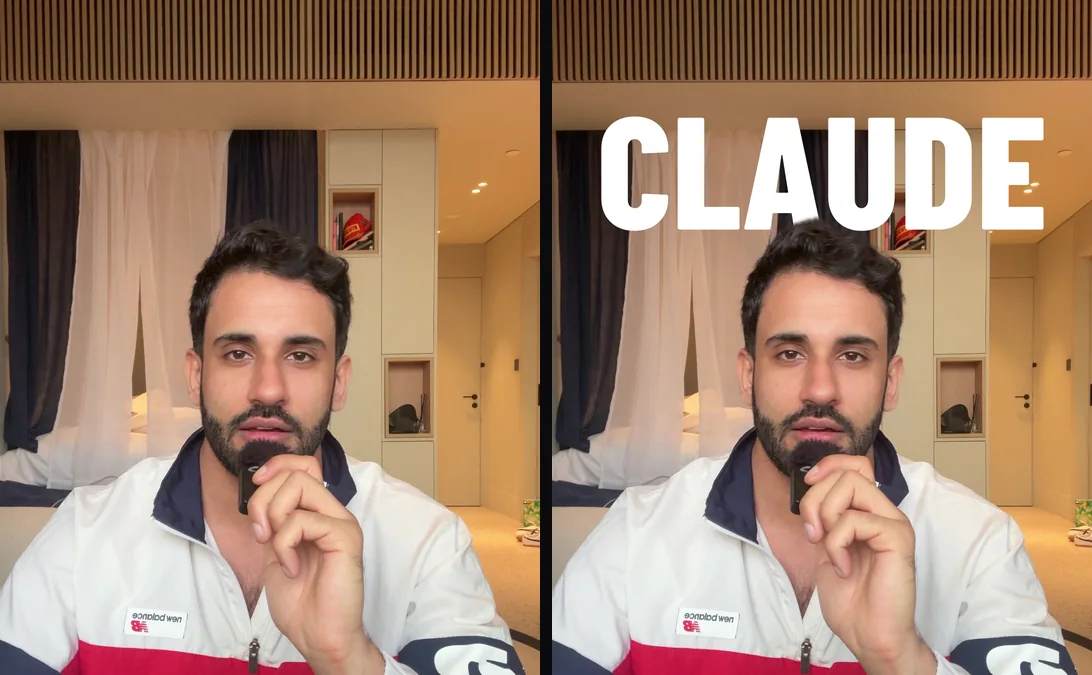
Using fx.py, put a giant word behind my head and save it to out/text-behind.mp4.

Word: {CLAUDE}, in heavy condensed caps (Barlow Condensed Black), 900px wide, white fading to light grey at the bottom.

Placement is the whole trick. Set the baseline so my head covers no more than the bottom 20% of the letters, even on the worst frame. Check every frame against the mask and print how much of each letter shows: every letter needs at least 70%. If that pushes the word above y=70, slide the video down instead.

Draw order: frame, then the word, then my cutout. The word rises 40px and fades in from 0.2s to 0.65s.

Show me stills at 1s, 2s and 3s, then render.
You need: headroom above you. A busy room is fine, the word sits in front of it. Try next: “Add a second line under it, {AI TOOLS} in coral, also behind me.”
Cinematic color grade
My first version graded the raw clip and wiped between that and the original. It barely looked different. What works is starting from flat, washed-out LOG footage and grading that back up past the original, so the split screen does the selling.
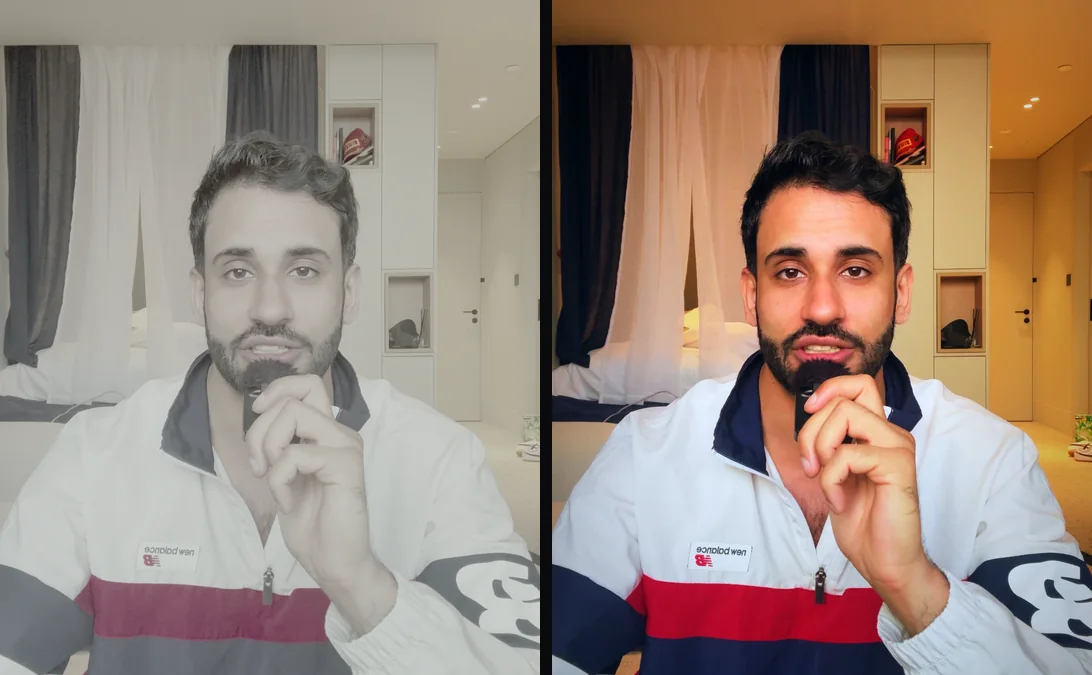
Using fx.py, make a before/after colour grade and save it to out/color-grade.mp4.

Before: make my clip look like flat, ungraded LOG footage, with a log curve, lifted blacks, rolled-off whites and saturation down to about 40%.

After: grade that flat version back up so it looks better than my original. Decode the log, then add a filmic S-curve, teal in the shadows, warm skin in the mids, clean whites that lean slightly cool, vibrance so dull colours gain the most, and a soft vignette. Look: {clean cinematic, warm skin, deep navy}.

Open on the flat version. At 0.9s, a white divider wipes left to right over about 1s (ease in-out), with a round handle at chest height. Graded on the left of the line, flat on the right. Small chips: {AFTER} top-left and {BEFORE} top-right, each fading as the line passes.

Show me stills at 0.5s, 1.4s and 2.5s, then render.
You need: any clip. It works best on footage you haven't filtered yet. Try next: “Give me three different looks as stills and let me pick before you render.”
When it looks off
Paste these as follow-ups. They fix the problems I actually hit making the reel.
It covers your face.
Check every frame against faces.json and move {the card} until it never overlaps my face. Show me the worst frame.Instagram hides it. The caption, username and buttons sit over the bottom fifth of a reel. I had to move the whole layout up after my first render.
Keep everything out of the bottom 20% of the frame. That's where Instagram puts the caption and buttons.The cutout edges flicker.
Blend each mask with the frames either side and feather the edge by 2px. Show me a close-up still.It's too subtle.
Push it further: {make the cards 20% bigger and brighter}. Stills again before you render.It moves too fast.
Slow every animation down 1.5x and hold the final state a second longer.Made one? Tag me @atareh on Instagram. I want to see it. If you want full edits instead of single effects, the skills in 5 Claude Code skills that edit video are where I'd go next.
Written by
@atareh
AI architect & creator. Writing, designing, and producing in AI and tech. Previously head of product at a healthtech SaaS; background in molecular science. Founded gogray.today in 2017.
Related
Keep reading.
Made by @atareh · x / twitter · instagram